Reading instructions
This page is the English translation of an integrated lecture, including the lecture content and related spoken script. The order preserves the progression from workflow, automation, human-machine division of labor, to organizational knowledge and document sorting. Identity introductions, administrative arrangements, private references, and interface elements without knowledge content are not included.
The latter portion regarding API, MCP, and the actual sorting demonstration follows Tool Connection and Invoice Agent Demonstration .
Lecture One: First improve the process, then consider automation
Automation amplifies the characteristics of existing processes: effective processes may become even more effective, while inefficient ones may quickly generate problems. Therefore, first verify requirements and eliminate unnecessary steps, then consider speeding up and automating.
The key issue is not just how much automation to adopt, but what tasks are suitable for automation, who is responsible for actions taken by the system, and how autonomy and oversight should be distributed.
The original lecture notes list several historical statistics: knowledge workers spend 2–4 hours daily on repetitive tasks; adoption of AI increases the completion speed of certain tasks by 37%; certain research discoveries and product outputs increase by 17%; process errors decrease by more than 70%; agent traffic grows by 7,851% year-over-year in 2025.
Note: The saved materials do not provide complete research, sample, and metric definitions for these numbers, so conclusions about equal returns across all activities cannot be drawn. Percentages cannot be directly added together; increased traffic does not equate to widespread adoption of reliable autonomy. These statements are retained as contextual background to the original explanation, while actual projects require their own baselines and evaluations.
Lecture Two: Workflows and Four Basic Components
Technologies for automation reduce manual execution. AI automation, enhanced with learning models, language, or visual capabilities, handles more variations in input. Both require clear workflows.
A workflow consists of tasks, decisions, and information flow to achieve a result. First, map out inputs, outputs, dependencies, and decision points to identify areas suitable for automation and those that require oversight.
Component | Role in the process | Original lecture example |
|---|---|---|
Trigger | What event triggers execution | Submit form, receive email, at 9 a.m. daily, on the 1st of each month, upload file or reach threshold |
Rules and Conditions | How to decide the next path | Amount exceeding 500 requires approval; premium customers enter a priority queue; escalates if no response within 24 hours |
Action | What is actually accomplished | Notifications, create records, update database, generate reports, schedule meetings, or assign tasks |
feedback loop | How to observe and improve | Completion rate, error frequency, time taken, satisfaction, exceptions, and corrections |
These amounts and times are example conditions, not general business rules.
Lecture 3: Four-step Implementation and Three Initial Screening Criteria
First, fully document the current workflow, dependencies, and exceptions; then proceed with simple, predictable rule-based steps; introduce model assistance when necessary for judgment; finally, define approval, boundaries, auditing, and rollback procedures for autonomous actions.
The level of automation can range from manual to assisted, semi-automatic, highly automated, to limited autonomous operation within defined boundaries. The original diagram shows that control transitions can be initiated either by human operators or by the system according to predefined rules. Full automation is not the goal for every task.
Three initial screening criteria are known as the "3R": repetition, for example, more than three times per week; consistency in following the same rules; and routine nature to the point that accurate steps can be taught to others.
If all three criteria are met, further evaluation for automation can proceed; otherwise, manual handling or a subsequent review may be retained. The original lecture simplified this as "automate if all conditions are met," but additional considerations regarding error consequences, data conditions, and maintenance costs must still be addressed.
A more conservative approach starts with business issues, prioritizing high-value, low-complexity cases, leveraging existing resources and processes, strengthening human capabilities, and measuring outcomes through business results.
Lecture 4: Process Automation, Rule Automation, AI, and Agent
Dimension | Rule-based automation | AI Automation | Agent |
|---|---|---|---|
Logic | Fixed rules | Data and model judgment | Arrange steps around the goal within the boundaries |
Change | "Changes in rules bring about change" | Can handle partial input variations | The strategy can be adjusted based on intermediate results. |
The role of humans | Design and maintain rules | Evaluation, Supervision, and Updates | Set goals, boundaries, and takeover |
Scope | Specific task | Connection process | Possible multi-step execution across tools |
Rule-based example: create a ticket and send a confirmation after form submission; AI example: route the request after understanding the intent and emotion behind the message; Agent example: research, verify orders, prepare follow-ups, and escalate when necessary.
Note: Natural dialogue does not equate to an Agent, and a button interface does not prove that the backend lacks AI. The ability to plan, use tools, and adjust actions must be verified through actual implementation; "real-time execution" does not mean that model parameters automatically learn.
Lecture 5: Write Down Implicit Knowledge
Many organizational rules reside in people's minds. Agents can only use information that is actually provided or accessible, so a key step in collaboration is to clearly document experience, exceptions, and judgment criteria.
The original lecture defined ontology as a structural diagram of domain knowledge, comprising concepts, attributes, and relationships. In actual scenarios, rules, exceptions, and sources may also be needed to explain how an organization makes judgments.
In invoice organization, this knowledge might be scattered across initial instructions, memory notes, folder structures, and filenames.
Concept | Illustrative rules |
|---|---|
"Entity" | Company A, Company B, and individual |
"Belonging" | A payment card is associated with a specific entity |
Relationship | Personal card payment company fees may require recording of receivable and payable relationships |
Time | Different companies may adopt different fiscal years. |
exception | A email account's certain tool cost actually belongs to B |
Backup leads | When payment details are not visible, verify further by combining the invoice name or recipient address. |
These are not formal accounting judgment rules, but rather explanations of how to provide domain-specific conditions to the application. Actual classification and tax implications require confirmation by someone with the relevant expertise.
Lecture 6: Runtime Framework, Domain Knowledge, and Agent
The runtime framework (harness) loads necessary memories, provides tools, and executes the loop; domain knowledge specifies what is true, who owns what, and which rules apply; the Agent reads, extracts, and evaluates, then acts or flags questions.
Documents from PDF invoices and emails are entered to form records and ledgers; uncertain cases are placed in the pending review queue. After personnel resolve inquiries, the new rules are confirmed and saved, and are then applied in subsequent executions.
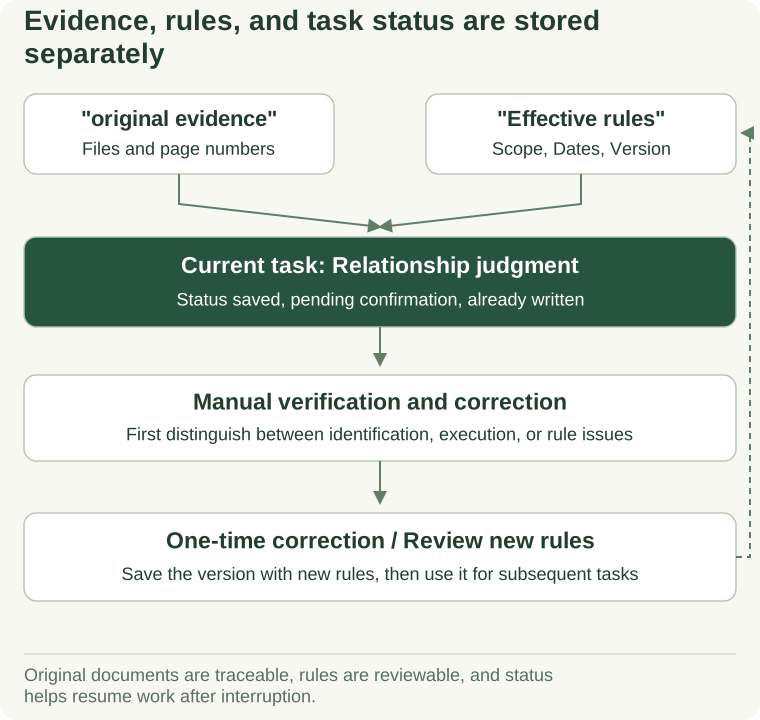
View textual explanation of the diagram
Original receipts and page numbers support fields and business relationship judgment. Rules store effective dates, applicable conditions, and versions, with execution status records maintained as executed and pending items. Human feedback first distinguishes between identification errors, execution errors, or rule changes, and new rules are saved only after review; this does not indicate automatic model training.
Illustrative emphasis on the need for evidence and review of correction rules, rather than automatically generalizing any single correction to all contexts.
The core acts like a map, and the Agent acts according to the map. Due to having goals, tools, and judgment, and the ability to query when uncertainty arises, this example has more adaptability than a purely fixed-step approach; it still retains human oversight, so it cannot be considered a fully autonomous system without human responsibility.
Verbal script one: Why can't we automate for the sake of automation?
Understanding automation and Agent concepts can be applied across different organizations, industries, and personal projects. First, remember two reminders: automating effective processes will amplify efficiency, while automating inefficient processes will amplify problems; before accelerating, question the requirements and eliminate unnecessary steps.
Here we are discussing not whether the technology is "cool," but rather which approach is suitable for a specific task, and ultimately who is responsible. The results obtained using AI still require human accountability.
The original explanation then cites several figures on productivity and usage growth to illustrate why this issue is of concern. It also reminds that gains depend on appropriate planning and implementation, not automatically occurring simply through tool adoption. Verification of the above figures has been addressed in the lecture notes section.
Discussion around agents has shifted from "one system doing everything" to "multiple specialized capabilities working together." However, the emergence of autonomous systems does not mean we can delegate power without limits. More importantly, it's essential to actively design the balance between autonomy and supervision, rather than simply measuring it by "how much automation" is used.
News often features claims of system failure, some of which may involve propaganda or exaggeration; yet permissions, controls, and actual consequences remain issues that require serious attention.
Oral script two: First, make sure the process is clearly understood
Automates the execution of pre-scheduled actions using technology, reducing manual intervention. AI automation incorporates capabilities such as machine learning, natural language processing, and computer vision to handle changes and patterns.
But having AI doesn't mean all components will learn on their own. It's more important to identify which steps are suitable for the system than to simply connect a pile of tools. Implementation requires phased cleanup, analysis, testing, and refinement, not necessarily full autonomy as the sole goal.
Start thinking in terms of workflows. Map out how tasks begin, the decisions involved, dependencies, and how they ultimately get completed. Begin with a small scope (such as an individual, team, or department) and don't try to cover the entire organization at once. Even a simple sketch on paper can help turn mental steps into checkable processes.
Trigger explanation: When does it start? Upon receiving an email, after form submission, at 9 a.m. daily, on a specific date each month, or when the system reaches a threshold. Condition explanation: Which path to take? Approval required if amount exceeds a set value, specific customers require priority handling, escalate if time limit is exceeded.
Actions are the actual steps taken under these conditions, such as sending notifications, creating records, updating information, generating reports, scheduling meetings, or assigning tasks. For example, upon form submission, the system identifies the request type and required handling process, then notifies the appropriate personnel.
Feedback loops show whether actions are effective. Track completion rates, errors, time saved, and satisfaction, gather issues, and improve for the next iteration. Simply running through a process without recording or updating does not constitute learning.
This is also an important part of the runtime framework: not only executing, but also observing the results and errors.
Verbal script three: Build implementation ability through small steps
There are many implementation frameworks; the following provides a starting sequence. First, fully document the workflow, identifying inputs, outputs, decisions, dependencies, and exceptions. Second, add rule automation to simple, linear sections and test thoroughly before full-scale deployment.
Third, integrate model-based context understanding and judgment when needed, for example, preparing different responses based on communication content. Fourth, establish governance for autonomous actions: which decisions must be manually approved, what actions can be taken independently by the system, how to audit and rollback, and when re-evaluation is required.
Technological advancements happen quickly, but one should not modify a system that already meets requirements simply because a new version has been released. Adjustments should only be made after identifying actual improvements and verifying them.
Initial screening can use three questions: Is it done frequently? Are the steps stable? Can it be taught to others for accurate completion? Doing it three times a week is just indicative and can be adjusted based on tasks. Steps requiring special judgment may not be suitable for direct automation; instead, human experience should be applied to areas that require more judgment.
All three meet the criteria, yet further consequences still need to be checked. If any do not meet, manual retention can be temporarily maintained, with re-evaluation conducted as experiments and requirements evolve.
Oral script 4: At which step of the workflow does AI appear?
If a process simply selects "yes" or "no" based on clear fields, the rules might be sufficient. After receiving an email, AI capabilities are added to understand complaints, issues, and emotions, enabling better assignment or response preparation.
The original explanation here also uses "Agentic" to describe the steps of emotion analysis. More accurately, a single emotion classification can still be merely AI automation; whether it qualifies as an Agent depends on whether there is goal planning, tool selection, and feedback adjustment; merely using a model is not sufficient to conclude that it's an Agent.
Flowchart tools can assist with requirement mapping, as previously discussed with tools like Visio and draw.io; when actual connections and execution are needed, platforms such as Make and Zapier should be explored. Drawing and execution are distinct functions, and simply having a diagram created does not imply that the system has been integrated.
Start with business problems, prioritize validation of high-value, low-complexity cases, leverage existing resources to enhance human capabilities, and evaluate outcomes based on actual results. Do not first decide that a specific AI must be used, then search for a place to fit it.
Verbal script 5: Specific Differences Among the Three Implementation Methods
Rule-based automation follows scripts and typically exhibits determinism: the same input and rules produce the same output. It is triggered by specific events such as buttons, timers, or form submissions, and does not learn or adapt as it is executed more frequently. Previously, telemarketing agents followed a question-and-answer manual for navigation, a non-digital analogy; in contrast, digital systems can create work orders after a form submission and then send confirmation emails according to templates.
The core idea behind AI automation is to leverage data to improve execution methods. It is contextual and probabilistic, not relying solely on fixed rules; it can integrate language processing, visual recognition, or predictive models to perform classification and recommendation tasks. For example, classify the intent and sentiment of customer messages, then route or prepare appropriate responses. Feedback can be used for future improvements, but actual update mechanisms must be implemented.
The core idea of the agent further evolves into planning execution routes around specific goals. It can connect and retain information using tools such as APIs and MCPs, completing complex tasks through a cycle of observation, planning, and action; multiple specialized agents can also be assigned distinct responsibilities in a coordinated manner. It can break down goals into steps, select among available tools, observe outcomes, and then decide on the next step. With appropriate context provided to reduce ungrounded generation, along with defined safeguards and permissions, the agent can independently advance within predefined boundaries. The original explanation used the analogy of "continuing to write scripts during execution" to emphasize that the route is not rigidly fixed; however, clear objectives, available tools, and operational boundaries still need to be designed by humans.
A chat interface showing only buttons might primarily follow a fixed path; a natural dialogue interface could leverage language models. However, examining the interface alone cannot determine the underlying architecture, and being able to chat does not imply the system can perform real-world operations.
Oral script 6: Why is tacit knowledge important?
Many rules come from long-term experience, which employees know, but the system doesn't. To enable agents to use this experience, the concepts, relationships, judgments, and exceptions must be explicitly written down.
The original explanation refers to this layer as the essence. It helps describe how an organization knows what it knows and how it evaluates information when encountered. Different organizations facing the same information may adopt different approaches due to differing goals, preferences, and experiences.
An anonymous example of public information analysis involves first gathering news and social content before using it for strategy. However, before generating strategy, it is essential to clearly define how the organization evaluates information and makes decisions; information collection alone should not be considered a strategic judgment.
New decisions combined with human feedback can generate subsequent materials, but they require scope of application and review. Comparing it to a "brain" is merely an analogy and does not imply that the model has independently developed human-like consciousness.
Oral Script 7: How does invoice organization reflect domain rules?
An anonymous group used to deliver large volumes of documents to the accountant at the end of each month, leading to significant sorting difficulties. They therefore experimented with establishing an auxiliary system. Once paper invoices, photos, or email PDFs are placed into a folder, the system reads the content, extracts fields, and then organizes them by company, year, and category.
It needs to know which entity owns which payment card, which expenses belong to which entity, and what exceptions apply. If the assignment cannot be determined, place it in a pending review status, with a human specifying "which entity does this belong to." These rules are not all contained in a single document; they may also appear in directories, file names, and previously confirmed notes.
For example, Company A, Company B, and an individual are distinct entities; if an individual's card is used to pay a company's bill, the corresponding relationship should be recorded. The recipient's email address can serve as a clue, but cannot automatically override the actual payment and its purpose. Separate accounting years also need to be clearly defined.
Folder and filename names should make the date, merchant, and purpose immediately clear, not just a string of numbers. After organizing, the spreadsheet can be updated; if uncertain, ask for clarification instead of guessing to complete the task.
This system has goals, tools, judgment, and human feedback, making it more flexible than fixed file transfer. The core is a map, and the Agent navigates this map; humans still need to verify that the map is correct.
Related Reading
Continue entering Tool integration and invoice processing Agent View the execution process; when reviewing technical roles, go back to Business Agents .
Reference and Extended Reading
The following is an editorial addition.
- draw.io Official Documentation : English, inquiry about the method for creating flowcharts and structural diagrams.
- n8n workflow documentation : English, distinguish between illustrated step-by-step instructions and actual implementation.
- NIST AI Risk Management Framework : English, assistance with scheduling, monitoring, documentation, evaluation, and accountability.