Reading instructions
This page is the English translation of the latter half, continuing from Workflow mapping and organizational knowledge First present the tool connections from the lecture notes, then retain the oral explanations for generating images, 3D scenes, and organizing sample invoices.
This describes the original demo and does not represent that the website actually runs these tools, nor does it provide original accounts, keys, private files, or identity-bearing screenshots. Product interfaces, models, and features may change; verification should be done against the corresponding version prior to reproduction.
Lecture One: No-Code Tools and Connectivity Capabilities
The original tool chart lists names such as Make, Claude, Perplexity Computer, n8n, Zapier, ChatGPT Agent, Cowork, Manus, Hermes Agent, and ZeroClaw to demonstrate different directions in automation and Agent technologies.
They do not belong to entirely identical product categories and are not part of a permanent, fixed capability ranking. When making a choice, evaluate the task, data, permissions, maintenance, and costs, rather than simply comparing names.
Lecture Two: API and MCP
API defines how software requests information or actions: an application sends a request, an external system processes it, and then returns a response. The calling party does not need to know the full internal implementation of the service, but must adhere to the interface and permission agreements.
MCP provides a unified approach for AI applications to discover and utilize external capabilities. Without connectivity, the system may only describe steps; with appropriate tool connectivity and authorization, it can retrieve corresponding information or execute actions.
The API focuses on specific functionalities, while MCP can serve as a unified interface for capabilities; the backend server may still invoke APIs. Therefore, MCP does not replace APIs, and possessing a connection does not grant full access to the other's functionalities.
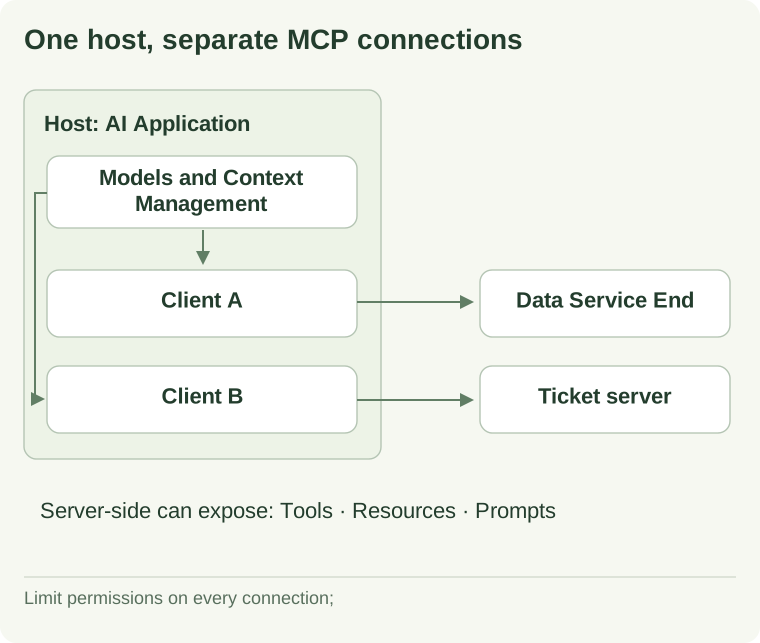
View textual explanation of the diagram
The host is the AI application, responsible for managing how the model is used and for multiple clients. In the diagram, client A connects to the data service endpoint, and client B connects to the ticketing service endpoint; service endpoints can expose tools, resources, or prompts. A unified connection method does not imply automatic assurance of access scope, facts, or execution security.
In the diagram, permissions, clients, and servers are still separated. Which capabilities are public and which requests can be executed depend on the actual configuration.
Oral script 1: Start with ready-made tools
Low-code and agent tools enable people without full development backgrounds to experiment, while developers can use them to reduce repetitive tasks and focus their efforts on key decisions.
The original explanation plan uses tools such as Make and Claude, and also mentions the possibility of a self-managed Agent pathway. It then returns to the API, explaining how different software exchange data and utilize each other's services.
Connect a model in a workflow platform
Demonstrate opening an existing social content workflow by connecting via configuration to integrate the model and other tools. The access credentials required by the tools come from the corresponding service account, then securely configured according to platform requirements.
The original demo temporarily created a demo API key, copied it to the connection settings, and then cleaned up. The script does not provide publicly usable credentials, and this page does not display any actual values.
Note: The original explanation compares keys to addresses or phone numbers, which can be confusing. An API is an interface; the endpoint address specifies where to access, while the key is typically used for identification or authorization of requests and should be treated as a credential and protected accordingly. Short-term usage does not necessarily mean all platforms support automatic expiration; actual mechanisms should be verified, and the key should be revoked when no longer needed.
In the past, accessing APIs often required developers to manually manage the interfaces; demonstrations highlight that many modern platforms have turned common integrations into configurable entry points, making experimentation easier. However, preconfigured connections do not eliminate the need for authentication, interface changes, or error handling. Through APIs, models, messaging tools, and other services can work within the same workflow, reducing the need for manual switching. They are not "packed" into a single model; instead, they still exchange requests and responses over the network and through application logic.
Verbal script two: Using MCP to connect image tools
In the chat app connector settings, locate the external image tool and reauthorize. After authorization is complete, generate a realistic racing car image and explicitly use the corresponding tool.
Apply first identifies available connections, prepares more specific image prompts, waits for confirmation before initiating generation. A display issue occurred during the demonstration, followed by an attempt to return to the image from tool results.
This indicates that conversation can serve as a tool entry point, but the request has been issued, the service has been accepted, the image has been generated, and the result can be displayed; these represent different states. A text version cannot prove that the final image meets all requirements, and this page does not consider an unobtained original image to be a successful reproduction.
Another application idea in the discussion: integrating image or voice service APIs into a local web application. This shows that a local interface can also leverage external capabilities; the statement that "the interface runs locally" and "model processing occurs locally" must still be evaluated separately. The original explanation stated that after connection, a chat application "has full capabilities," which requires a more nuanced understanding: it can only use features that are actually exposed by the server, accessible to the user's account, and supported by the hosting environment.
Verbal script three: Using MCP to operate a local 3D scene
Next, we'll demonstrate a transition from cloud-based image tools to local Blender. Blender is an open-source 3D creation software, but actual modeling still requires knowledge and practice.
The demo environment has configured connection components and local services, enabling the chat application to operate scenarios via MCP. The demonstration in the interface showing relevant settings does not imply that every Blender installation comes with these components by default.
Request: First clear the example scene, then create a Victorian-style chair. Photos, illustrations, or photogrammetry data may also be provided as references; the complete scene also involves objects, materials, lighting, and other components.
Note: Clearing the scene is a modification operation and should only be performed in a clearly demarcated demonstration copy, with a recoverable version retained. Generating a model that appears to match the target does not equate to establishing a digital twin with engineering accuracy or real-time state synchronization.
This example demonstrates that local applications can also be integrated into AI tool workflows. Compared to cloud-based services, the execution occurs at a different location, but whether data leaves the device still depends on the entire call chain, not just the fact that Blender runs locally.
Oral Script 4: Authorization Identity, Organizational Governance, and Document Location
Original discussion raises a practical question: when releasing an Agent with connections, should we use the end user's permissions or the creator's permissions? This affects who can read and execute what, as well as governance and usability.
Organizations must first avoid unapproved shadow AI. The ability of an individual to log in to a tool does not grant permission to send organizational data for processing. The purpose of the data, contracts, industry regulations, and service terms must also be considered.
The original example used an employee sharing internal code with a chat tool for analysis, illustrating intellectual property and data leakage risks. The source of the materials involved in this event has not been fully verified, so what is retained here is an assessment of the issue, not a verified incident report.
Cloud processing may imply that data is transmitted to the service provider, but this does not necessarily mean that all cloud services use the data for training, or that all closed-source commercial models cannot be used by an organization. Each product, contract, retention settings, and access method should be individually reviewed.
On-premise or self-managed models represent a viable optional pathway, accompanied by requirements regarding hardware, updates, permissions, logging, and backup. Open weights do not automatically imply security, and running entirely on local devices does not automatically satisfy all governance criteria.
The original explanation prefers a local approach for sensitive data, reflecting its implementation orientation; suitability for a particular organization should be determined based on actual threats, resources, and contractual terms.
Oral script 5: First explain the target of the invoice Agent
The next example is invoice consolidation. We hope the system can identify new files, extract date, vendor, amount, currency, category, account, tax, and payment reference when photos, scanned documents, and email PDFs are placed into the inbox folder.
Then rename, categorize, and place into appropriate folders, update the cost sheet, and leave uncertain issues for human review. The original explanation mentioned delivery formats such as Excel, accounting software, or merged PDFs, depending on the actual user's needs.
This is not about having the system replace all accounting work, but rather assisting in organizing data. The demonstration uses fictitious invoices; the original explanation also distinguishes between cloud tools used for convenience in the presentation and the preferred actual deployment approach of on-premises solutions.
Initial project description
Original demo first creates a project with a brief objective: convert photos, scanned documents, and email PDFs into records usable by accountants; separate business from personal expenses, archive by fiscal year and expense type, use clear naming conventions, and record suggested categories in a table.
Save materials, goals, and instructions within a project to reduce the need for repeated explanations, but do not assume that all content will be permanently remembered. Specific context, file access, and memory mechanisms remain subject to product implementation limitations.
The original script contains unclear transcription of the model name selected during the demonstration, so no version is inferred. The explanation emphasizes using an appropriate computational level for resource allocation, rather than selecting the most expensive configuration for all tasks.
Oral script 6: Turn rules into actionable requirements
The original demo was then supplemented with more specific instructions. Here, the informational requirements are retained, and the directory names are represented with illustrative names.
- This is the Voucher and Expense Database. New entries should be placed in the Inbox folder; before execution, review available background and folder information.
- If a PDF contains multiple invoices, each should be individually recognized and the corresponding records saved, while the original documents should be retained.
- Read the date, merchant, purchased item, total amount, tax details, and payment clue such as the last four digits of the payment card; do not collect unnecessary full card numbers.
- Distinguish between business and personal transactions based on confirmed rules. When payment details are not clearly indicated, review the invoice name or recipient address, but always verify independently.
- Business vouchers are archived by entity, accounting year, and type; personal vouchers are organized by the corresponding year.
- Name files with clear rules and add business projects to the expense sheet.
- Do not guess. When uncertain, move to pending and note the issue in the comment; do not delete the original file.
- Indicate the number of items processed, the total by category, and the number of unanswered questions.
- Corrections confirmed by personnel can form new rules, stored in business documentation or rule files, and applied in appropriate scopes for future execution.
Note: The payment card is merely a clue and is insufficient alone to determine the nature of the business or tax treatment. The fiscal year, entity relationships, and expense classifications should be confirmed by actual rules and individuals with the relevant expertise; this description is provided to explain the design of the process.
The original demo connected the local example directory to the application, then issued only a short request: "Follow project instructions and process the invoices in the folder." The request could be short because detailed boundaries were already defined in the project; it was not because the system inherently knew what to do.
Oral script 7: How to supplement missing information before execution
After execution begins, the tool lists the preparation steps: reading 20 sample invoices, categorizing, archiving, and renaming, establishing a cost table and business descriptions, then verifying and consolidating.
It does not assume a fiscal year directly, but instead asks for the year-end date; the demonstration response uses December 31. It also asks which example payment cards belong to the business. The original explanation noted that these could be provided in advance, but intentionally left blank, making it useful to observe whether the system then prompts for them.
"Not knowing first, asking first" is an actual requirement, not a slogan added at the end. Having folder permissions does not mean one can arbitrarily modify other parts of the computer; the scope of execution should still be restricted.
While the original demo is pending, further discussion on the choice between cloud and on-premise solutions is needed. Before handing over financial data to the cloud, permissions and processing conditions must be confirmed; if opting for an on-premise system, it is also necessary to verify whether the model, applications, and other connections still involve external data transmission.
Oral script 8: Check the results, then test and correct
The original demonstration then showed: the original file remained, new business and personal directories were added, business content was organized by year and category, and tables were established.
This is only the interface result visible to the demonstrator and is insufficient to prove that all fields and totals are correct. True acceptance should also compare original quantities, extracted values, duplicates and omissions, classification criteria, and table content.
Next, the presenter selects a meal receipt previously categorized as personal, explains that it actually belongs to business expenses, and demonstrates how the system updates the directory, table, and rule files.
Command failures and file overwrite issues occurred during execution. The original demonstration speculated that this might be due to the table still being open, triggering a request to allow file deletion; subsequently, an updated version of the cost table was generated.
Note: This highlights a key tension in the original demonstration: the initial requirement was to preserve the original, but later a broader authorization for deletion emerged. Directly approving permanent deletion should not be considered a recommended step. A reliable implementation should distinguish between the original and derivative files, limit the scope of modifications, retain backups, verify that the correct version is being updated, and confirm that corrections are complete.
Original explanation: Open the business description, and when you see the "Rules Already Learned" section, apply the corrections to future judgments. Here, "learning" refers to saving and reusing rules, without involving retraining of the model. New rules should also specify the applicable scenarios to avoid generalizing a one-time exception to all food and beverage receipts.
Oral script 9: Let the process run continuously
The project may continue to receive instructions, or it may be executed according to actual product support settings such as daily or weekly schedules. However, scheduled startup, file permissions, failure notifications, and model invocation all need to be implemented separately and cannot be assumed to have been successfully configured merely by stating them once in a conversation.
Asking questions when uncertain is part of the human process in the loop. The original explanation also mentioned further development of a review interface: opening invoices that cannot be recognized, manually correcting dates or other fields, saving the changes, and then reinserting them into the system.
Export payment emails to a specified directory, organize them, and deliver the materials, which can reduce pressure during the end-of-month batch processing. The original explanation stated that their actual system has been running for over a year, clearly alleviating the pressure of centralized sorting. This is based on individual experience and cannot replace independent measurement or guarantee similar results across all organizations.
How to connect a computer to a smartphone
The original discussion concluded that applications can have a web interface, deployable on a user's own server, in the cloud, or on a private network, and then accessed from a mobile device based on permissions. Desktop projects might also support mobile access points, though the specific behavior depends on the product.
Being able to view chats from a phone and having direct local file access from the phone are not the same thing. When choosing a deployment location, it's necessary to consider access methods, data boundaries, and continuous operation, not just whether the interface is convenient.
From demonstration to a verifiable system
This set of examples connects goals, data, rules, tools, execution, and manual verification. It demonstrates practices worth studying, as well as failures, permission, and override issues. In actual use, "the tool is complete" should be separated from "the record has been verified correctly," and original documents and recoverable processes should be retained.
Related Reading
Read first Workflow mapping and organizational knowledge Where do rules come from; the formal concept of protocol is seen in MCP and API .
Reference and Extended Reading
The following is an editorial addition; specific reproduction conditions are subject to the actual version and documentation.
- Blender Official Manual : English, query scenarios, objects, and software operations; verify the components used for MCP connection.
- MCP Official Architecture : English, query host, client, server, and capability boundaries.
- Make Help Center : English, query connection, credentials, and workflow runs.
- OWASP: Generative AI Security : English, understand tool invocation, document processing, and application security risks.