Reading Objectives
This is an English translation of the published reading. We will explore the impact of AI on job tasks, compare augmentation with automation, examine use cases across different functions, understand capability development and change management, identify opportunities for your own work, and evaluate and gradually implement appropriate tools.
1. Enhancement and automation have different differences.
enhance Let the system help humans complete analysis, organization, and creation, while humans retain judgment. For example, analysts use AI to browse large volumes of materials, then interpret the results and make decisions.
Automation Delegate certain tasks to the system for execution, such as handling routine requests according to predefined rules. Whether it can operate completely without human intervention depends on the task risk, result verification, and exception handling conditions.
The original material uses medical literature analysis and contract review as examples, using human-machine collaboration as a starting point. The case of IBM Watson mentioned in the text is presented as a historical overview and should not be construed as reflecting the current state of any institution's clinical system, nor does it prove that the system is suitable for independently providing treatment recommendations.
Potential benefits include reducing time spent on routine tasks, assisting in information analysis, decreasing errors in repetitive work, and freeing up time for creativity and communication. However, these are all measurable outcomes, and AI may introduce new errors, and it does not inherently guarantee that collaboration is superior to either party working alone.
Two. How different functions are used
Administrative affairs
Schedule meetings, handle routine inquiries, and manage calendars can all benefit from tools that reduce the need for repeated coordination. The original uses an anonymous example of an administrative team saving about 15 hours per week to illustrate the potential; without measurable evidence, it cannot be directly projected as an expectation for one's own team.
Information Retrieval and Knowledge Management
The system can organize and structure content, enabling users to query it using natural language and reducing the time spent searching for information across folders and databases, and may also help reduce knowledge silos within departments. However, "making information searchable" must simultaneously preserve access permissions, and should not open previously restricted content to all users.
Decision Support and Analysis
Financial staff can assist in browsing market and company information; human resources teams can analyze engagement and retention risks. The system processes more data, while humans are responsible for interpretation and taking action. Decisions involving personal opportunities, health, or finances require review commensurate with the associated risks.
Communication and collaboration
Writing tools assist in drafting emails and reports, translation tools support cross-language communication, and meeting tools help summarize key points and action items. Important commitments, names, numbers, and responsibility assignments still require verification.
Creativity and content
Can produce marketing drafts, visual concepts, or promotional voiceovers to help creators jump into revisions from a blank page. Human creative direction, brand judgment, and strategic objectives still influence the final output.
Three, what conditions are needed for successful adoption?
Technically, basic data literacy, understanding of data collection methods, and the ability to interpret AI results are required. Non-technically, critical thinking, creative ability to identify applications, and adaptability to new workflows are needed.
Change management includes clearly explaining why the change is needed, involving actual users early in the selection process, making management support visible, providing continuous training and assistance, and recognizing validated early outcomes.
Common concerns | The response that needs to be taken |
|---|---|
Will jobs and roles disappear? | Accurately describe how the character might change. |
Is the system really useful? | Show real examples and reasonable expectations |
How will the data be used? | Establish clear data governance and protection guidelines |
What to do if you can't learn a new system | Provide adequate training, practice, and follow-up support |
A good starting point is to define specific, impactful use cases; ensure data quality and accessibility; establish feedback mechanisms; measure and communicate results; and have individuals from different departments who are willing to implement the initiative to support their peers.
Four: Discover opportunities from your daily tasks
First record how much time is spent on each activity, then evaluate one by one: whether the task is repetitive and predictable, how much information it processes, and how much it contributes to the primary goal.
Repetitive, data-intensive tasks with low judgment risk are suitable candidates for automation; data-intensive tasks with high value and judgment requirements are better considered for augmentation first. However, low value does not imply zero risk of error; specific consequences must still be evaluated.
Further explore information bottlenecks: where are we waiting for data? Where could better predictions aid planning? Where can faster information access improve decision-making?
Expected impact | Implementation difficulty | Original material recommendation |
|---|---|---|
High | low | Priority pilot project |
High | High | Careful planning, phased verification |
low | low | Can be tested on a small scale, but with limited investment |
low | High | Reconsider whether it's worth it |
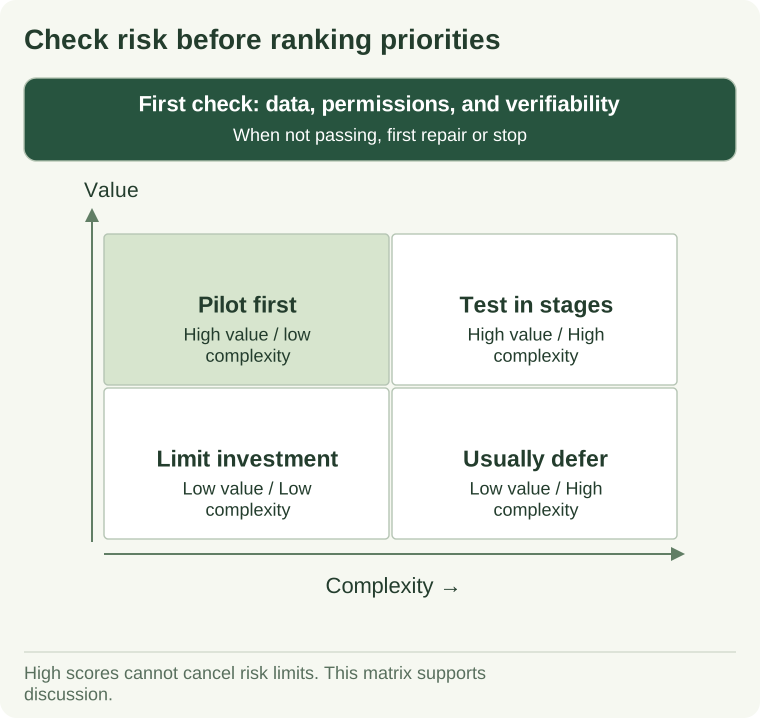
View textual explanation of the diagram
First, verify that the data is legally usable, that permissions are controllable, and that key results can be validated. After passing this threshold, evaluate value and complexity: prioritize high value with low complexity for pilot testing; for high value and high complexity, implement phased validation; for low value and low complexity, limit investment; for low value and high complexity, defer action.
The top-left corner of the figure represents a higher expected value and lower complexity, making it suitable for prioritized validation. It is not the actual project scoring result; evaluation still requires one's own data and measurements.
Five. How to choose and implement tools
First define the specific problem, essential functionalities, success criteria, integration requirements with existing systems, and security and privacy conditions.
Evaluate using real business scenarios, involve end-users in the demonstration, and calculate total cost: not only licensing fees, but also implementation, training, support, and maintenance. Demonstration materials must be used within permitted boundaries and must not disclose private information.
Start with a small pilot, monitoring changes in time saved, error rates, user satisfaction, or business outcomes, then proceed with ongoing training, feedback, performance monitoring, and periodic re-evaluation.
The original example uses appointment scheduling: first pilot the solution within a small service team to address system connectivity and user experience issues, then provide training before scaling up. The value of this approach is to reduce the risk of a large-scale rollout.
The task analysis can then be organized into Comprehensive Operation Opportunity Solution .
Video transcript one: How AI is changing work
First, imagine an administrative team saving 15 hours per week using a scheduling assistant, equivalent to nearly two full days of work. The example uses this anonymous case to illustrate the potential in everyday tasks, not to provide measurable outcomes achievable by all teams.
AI works alongside humans in many industries, either enhancing or automating tasks. Enhancement enables humans to process more data, such as market conditions and corporate information for analysts; automation assigns certain tasks to systems. The original text uses extensive contract review as an example, but the extent of tasks that require no human intervention must be determined based on task risk and actual validation.
The goal of human-machine teams is to have the system handle appropriate data and repetitive tasks, while humans continue to interpret, judge, and take action. The original explanation emphasizes that prioritizing enhancement represents a more prudent implementation approach, rather than guaranteeing that all combinations outperform either side individually.
It lists four expected benefits: increasing productivity by automating routine tasks, freeing up time for work that requires human judgment; aiding decision-making through broader data analysis; reducing errors caused by fatigue in repetitive processes; and providing more time for creativity, relationship-building, and strategy.
These should be treated as measurement objectives. AI will also generate its own errors, so it cannot be assumed that it has eliminated all mistakes. True value lies in enhancing human expertise, not in shifting responsibility to smooth, effortless responses.
Video transcript two: Uses across different business functions
AI is not solely for tech companies or data professionals. Finance, human resources, marketing, administration, and creative teams may all have data processing, pattern recognition, and daily operational tasks.
Administratively, the assistant can help schedule meetings, handle routine inquiries, and manage calendars, reducing the need to constantly attend to minor tasks, allowing individuals to focus on more complex support and relationship management.
In terms of knowledge management, indexes can be established for organizing content, enabling document retrieval using natural language, and reducing the need to repeatedly search across folders and databases. Content previously confined to a specific department can now be accessed by those who need it within appropriate permission boundaries, fostering collaboration and reducing redundant work. However, this does not mean that confidential information should be made accessible to everyone.
In decision support, AI can assist in browsing large datasets, identifying trends, and providing recommendations. Financial staff can access more market and company information, while human resources teams can examine engagement levels and retention risks, with human interpretation and decisions made on how to proceed. When personal or significant business implications are involved, appropriate reviews are required.
In terms of communication, a writing assistant helps draft emails and reports, translation support facilitates cross-language interaction, and a meeting assistant records summaries and action items, allowing participants to focus more on discussion. However, key facts and responsibility assignments still need to be verified, assumptions that all content discussed in a meeting was accurately recorded must not be made.
Creative work can also benefit: marketing drafts help overcome the blank page, visual and auditory concepts help explore direction. The system handles initial generation or routine components, while humans oversee creative objectives, branding, and strategy.
Each function has potential value, but the key is identifying where improvement matters most within your specific context and workflow, rather than adding an AI button everywhere.
Video script three: Adoption is also a change in people
Some AI implementations stall because organizations overlook the changes in people. Successful adoption is not just a model issue; it involves people and processes as well.
Technical capabilities include basic data literacy, understanding methods of collection, and interpreting generated results. Non-technical skills are equally important: critical thinking helps evaluate outputs, creativity enables the discovery of new applications, and adaptability supports navigating changes in workflows. Teams must know both what tools can do and when and how to use them.
The original explanation proposes five key points for change. Clearly articulate the changes and their benefits, not just stating "we need to switch tools"; involve actual users early in the selection process; ensure management sees and supports the changes; provide sufficient training and long-term assistance, not just one-time training; recognize and validate early achievements to build confidence.
People's concerns are valid and require specific responses. Anxiety about workplace safety needs honest explanations of how roles might change; doubts about system capabilities require real examples and reasonable expectations; privacy issues require clear data governance; and pressure to learn new systems needs training and support.
Do not frame these concerns as "resistance to new technology," but rather address them through action and communication.
Best practices typically begin with clearly defined, high-impact use cases, ensuring data quality and accessibility, establishing feedback loops, measuring, and communicating results. Individuals from different departments who are willing to adopt these practices can also help colleagues adapt.
Human adoption and process integration are essential for technology to realize its value; this does not mean technical issues vanish automatically, but rather that we cannot focus solely on the technical aspects.
Video script four: Finding your own opportunities
Significant opportunities might be hidden within routine, repetitive tasks. By observing them systematically, it becomes easier to move from "AI seems to help" to concrete actions.
First, look at time allocation: which activities take up the most time? Making small improvements in these areas could lead to significant gains. For each major task, consider three things: whether it is repetitive and predictable, how much data it involves, and how much it contributes to the primary objectives.
Highly repetitive, data-intensive tasks with low judgment requirements can be studied for automation; data-intensive tasks with higher value and judgment demands are better suited for initial exploration of augmentation, allowing systems to organize information while humans take responsibility for analysis and decision-making. Low value does not imply low error risk; specific evaluation is still required.
Further explore information bottlenecks. Where are resources waiting? Such delays may indicate a need for improved retrieval or reporting. Where can better predictions assist in scheduling? Historical patterns may offer clues for planning. Where can faster access to information improve decision-making? Query and analysis tools may help obtain timely evidence.
These bottlenecks simultaneously affect efficiency and judgment quality, and thus warrant priority investigation.
Do a small exercise: List three to five key activities, evaluate each for repetitiveness, data intensity, and value contribution; identify one task that could benefit from automation or augmentation; investigate a tool that could address it.
Start small, measure actual impact, then scale up what has proven effective.
Related Reading
Use daily task analysis for Comprehensive Operation Opportunity Solution ; when involving multiple systems, re-read From automation to intelligent workflows .
Reference and Extended Reading
The following is editorial supplementation, and no endorsement is provided for the anonymous case numbers.
- Google: Machine learning problem definition : Chinese, to help distinguish business objectives, model tasks, and success criteria.
- Microsoft: Responsible AI : English, understand issues related to reliability, fairness, privacy, and organizational adoption.
- NIST AI Risk Management Framework English: query methods that integrate evaluation, monitoring, and accountability into the implementation process.